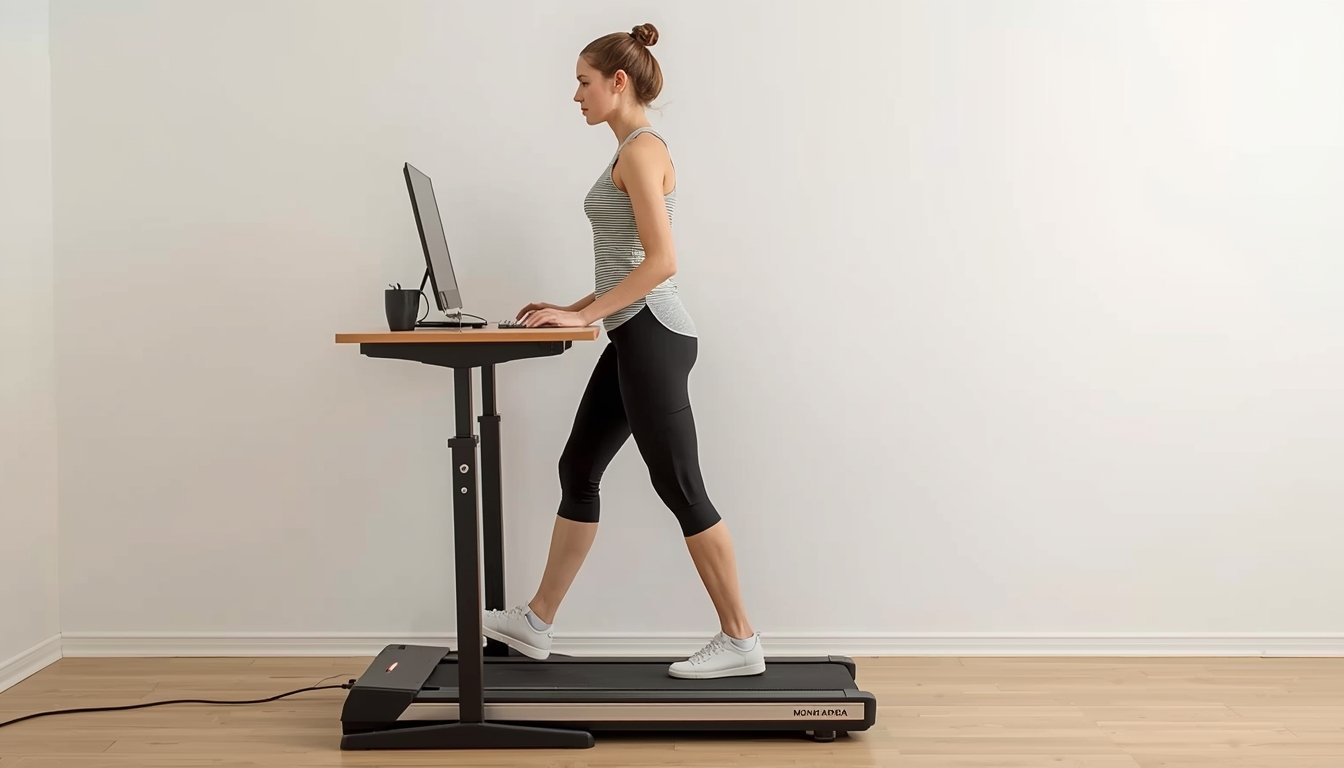
The ergonomics of walking while working come down to one simple goal: make movement feel natural enough that your body stays comfortable and your work still feels manageable. That usually means a slow walking pace, a properly positioned desk, and a setup that lets your shoulders, arms, and neck stay relaxed instead of compensating for a poor workstation. If you are already looking at the best walking pads for home office use, ergonomics is what determines whether the machine actually improves your workday or just adds a new source of strain.
Why ergonomics matters more than speed or features
Many people assume that once they have a walking pad and a standing desk, the setup will automatically feel right. In practice, the machine is only one part of the experience. Ergonomics matters because the body reacts quickly to small setup problems. A desk that is a little too high can make the shoulders tense. A screen that sits too low can push the head forward. A walking speed that is slightly too fast can make typing feel awkward and encourage poor posture without you even noticing.
Walking while working changes the way the body organizes itself. You are no longer standing still or sitting in a chair with a stable base. Instead, your legs are moving rhythmically while your upper body tries to stay controlled enough to read, type, and focus. That creates a very different demand than ordinary desk work. Good ergonomics helps the body handle that demand without turning the workday into a steady stream of small compensations.
This is why comfort is a better test than novelty. A setup may feel exciting on the first day, but if your neck is tight, your wrists feel overloaded, or your lower back starts working harder than it should, the system is not really doing its job. Ergonomics is what makes walking while working sustainable rather than just interesting.
How to position the desk, screen, and keyboard
- Your desk should be high enough that your elbows stay close to a comfortable right angle instead of lifting your shoulders upward.
- Your screen should sit high enough that you can look forward naturally rather than tipping your head down for long periods.
- Your keyboard and mouse should stay close enough that you do not reach forward or lock your arms straight while walking.
- Your wrists should stay neutral instead of bending sharply upward because the desk surface is too high.
- Your monitor should be centered in front of you so your neck is not rotating slightly for hours at a time.
- Your feet should have enough walking area that you are not shortening your stride unnaturally just to stay in position under the desk.
- Your work surface should feel stable and uncluttered so you are not constantly adjusting around drinks, cords, notebooks, or laptop stands.
What good posture actually feels like on a walking pad
Good posture on a walking pad does not mean standing stiffly or trying to look perfectly upright all the time. It should feel relaxed, balanced, and sustainable. Your head should feel stacked over your body rather than jutting toward the screen. Your shoulders should feel loose rather than held in place. Your arms should be able to move naturally enough that typing still feels possible without bracing through the upper back.
A helpful way to judge posture is to notice where tension builds first. If your neck tightens, the screen may be too low or too far away. If your upper traps feel overworked, the desk may be too high. If your lower back feels loaded, you may be subtly leaning forward into the workstation instead of letting your body stay centered over the walking surface. These are ergonomic clues rather than random aches.
The lower body matters too. Walking while working should not feel like marching in place or forcing exaggerated steps. A natural, small stride is usually the most practical for desk work. The goal is not athletic walking form. The goal is controlled movement that lets the upper body stay calm. If your posture feels forced, it usually means the setup is asking your body to do too much at once. Good ergonomics makes the whole system feel quieter and less effortful.
The role of pace, task type, and session length
One of the biggest ergonomic mistakes is treating all desk work as if it can be done at the same walking speed. In reality, task type changes everything. Reading emails, reviewing documents, or listening on a call usually works well at a slow pace. Detailed writing, spreadsheet work, or precise mouse tasks often feel better at an even slower pace, or during standing or sitting breaks. Ergonomics is not just about body position. It is also about matching movement to the kind of work you are actually doing.
Session length matters in the same way. Even a good setup can start to feel off if you stay in one mode too long. Walking while working tends to feel better in manageable blocks than in one long stretch where small inefficiencies have time to build into fatigue. If the workstation is adjusted well, those blocks can still add up to a meaningful amount of movement during the day without making the body feel overworked.
Pace should support concentration, not compete with it. A speed that feels fine in theory may still be too fast for regular typing or focused work. The right pace is usually the one that lets you forget about the machine after a few minutes. Once you are constantly aware of the movement, the ergonomic balance is probably off. Slow, controlled walking is what usually makes the setup feel like part of the workday instead of a separate activity.
Common ergonomic mistakes that make walking while working harder
- Using a desk height that worked for standing still but feels too high once walking begins.
- Looking down at a laptop screen for long periods instead of raising it to a more natural viewing height.
- Walking too fast for the task and then compensating with tight shoulders, a rigid torso, or short, awkward steps.
- Reaching too far for the keyboard, mouse, or second screen instead of keeping the main work zone close to the body.
- Trying to use walking mode for every task instead of switching between walking, standing, and sitting when needed.
- Ignoring footwear, flooring, or the way the walking pad sits under the desk, even though those details affect stability.
- Assuming discomfort is normal “adjustment” when it is really a sign the workstation needs changing.
How to build a setup that stays comfortable over time
The most ergonomic walking workstation is not the one with the most equipment. It is the one that fits your space and working style with the least friction. Start by getting the basic geometry right: desk height, screen height, and a walking speed that feels genuinely sustainable. Then pay attention to how the setup behaves over a week rather than a single session. Some issues only show up after repeated use, especially neck tension, shoulder fatigue, or subtle lower-back strain.
It also helps to think in terms of flexibility instead of perfection. Walking while working does not need to be an all-day state. In many home offices, the most practical routine is a mix of walking, standing, and sitting depending on the task. That variety is part of good ergonomics because it prevents one posture or one movement pattern from carrying the entire load. A workstation becomes easier to live with when it supports different modes instead of forcing one fixed way of working.
Finally, treat comfort as useful information, not something to push through. A good ergonomic setup usually feels boring in the best possible way. You are not constantly thinking about your shoulders, your wrists, or where your feet are landing. The machine fades into the background and the workday keeps moving. That is usually the clearest sign that the walking setup is doing what it should.